SortiiiQ
A safety-first workspace for turning years of scattered files into a verified Master Library—without losing data or breaking existing references.
From digital chaos to a trusted Master Library
Over the years, digital files tend to spread everywhere: across computers, external drives, backups, cloud storage, old project folders, and forgotten archives.
Photos mix with exported versions, documents exist in several copies, related files become separated, and nobody is quite sure which version is the right one. Cleaning this up manually is slow—and moving or deleting the wrong file can cause permanent data loss or break external references.
SortiiiQ is my attempt to solve this problem safely.
It is not just another file manager. It is a controlled transformation system designed to turn years of digital chaos into a structured, searchable, and verified Master Library.
The challenge
The obvious solution would be to scan everything, detect duplicates, create a better folder structure, and start moving files.
That is also the dangerous solution.
A file may look redundant while still being referenced by another application. Two files with the same name may contain different data. A folder that appears abandoned may still be part of a backup or project workflow.
The system therefore cannot treat assumptions as facts. Before changing anything, it must understand what currently exists, propose what should happen, and make every physical operation visible and reviewable.
The core model
SortiiiQ separates the process into distinct stages:
Disk Reality The files and folders that physically exist across configured sources.
Inventory A read-only representation of discovered files, folders, metadata, and relationships.
Triage Workbench A workspace for reviewing detected asset candidates, resolving uncertainty, and defining the desired structure.
Operation Plan An explicit description of every physical change required to produce the final library.
Master Library The verified output created only after the proposed operations have been reviewed and approved.
This separation is fundamental. The inventory describes what exists. Rules describe what should happen. The operation plan describes what will physically change.
Nothing should be moved simply because a detector made a confident guess.
Logical assets instead of isolated files
A single digital item is often represented by multiple physical files.
A photograph may have an original RAW file, an edited version, a thumbnail, and metadata. A project may contain source files, exports, documentation, and supporting assets.
SortiiiQ is designed to group related files into Logical Assets. These assets provide a meaningful view of the content without pretending that the underlying physical files do not exist.
Logical Assets are part of the internal model. The Master Library is the final published structure. Keeping these concepts separate makes it possible to reorganize information without immediately modifying the source data.
Safety before automation
The main design principle is simple:
Analysis may be automatic. Destructive decisions must remain controlled.
The system is built around several safety rules:
- Scanning is read-only.
- Removing a configured source never deletes its files.
- Long-running operations are processed as background commands.
- Physical changes must be represented by an explicit operation plan.
- Processing history and failures must remain auditable.
- Uncertain detections require review instead of silent execution.
Automation is useful only when its decisions can be understood, verified, and reversed when necessary.
Current implementation
The first implemented vertical slice focuses on discovering and representing the existing disk reality.
The application currently includes:
- management of root folders through Settings → Sources,
- read-only inventory scanning,
- background re-scan commands,
- a processing queue with execution auditing,
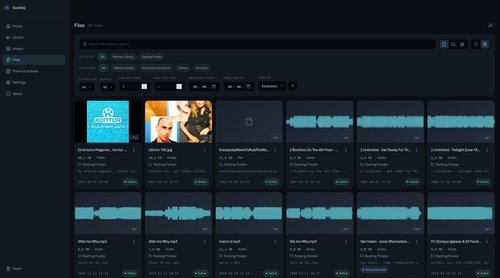
- an inventory browser with filtering,
- server-side paging,
- list and card views for discovered files.
This creates the foundation required for later stages such as asset detection, metadata review, duplicate analysis, triage, and operation planning.
The important part is that the foundation already follows the final safety model: discovery and representation come before transformation.
Product and interface direction
SortiiiQ should feel like a calm control room for someone’s digital life.
The interface uses a restrained dark visual style with clear hierarchy, spacious layouts, and subtle technical details. The goal is not to make file management look flashy. The goal is to make complex decisions understandable and reduce the anxiety associated with reorganizing valuable data.
Every screen should help answer one of three questions:
- What exists?
- What does the system propose?
- What will actually change?
What makes SortiiiQ different
Most file-management tools focus on direct manipulation: rename, copy, move, or delete.
SortiiiQ focuses on the decisions surrounding those operations.
It treats organization as a controlled pipeline in which the current state, proposed structure, human decisions, and physical execution remain separate. That makes it possible to automate repetitive work without giving up transparency or control.
The long-term goal is not a perfectly tidy folder tree.
It is a Master Library that can be trusted.
More from the desk.
Other things I've written and built — same instinct, different chaos.
The QA Engineers Who Can Read Will Survive
When generation becomes cheap, verification becomes the bottleneck.
QA Like Glass: It Doesn't Have to Be Seen — But You Have to See Through It
Invisible work, transparent decisions, and why quality can't be proven by counting bugs.
MyMoneyApp
A personal finance app built around one simple idea: money should be understandable, transparent and not stressful.